
latest
The best Google Calendar shortcuts
Google Calendar helps you filter through the clutter and manage schedules faster with keyboard commands

Traditional calendars stop at helping you mark dates, but Google Calendar takes it a step further. You can schedule events, invite guests, and set reminders from small phones and tablets to larger devices. A first glance at the app can be confusing, especially if you're a busy person. Shortcuts aid you in navigating through the interface quickly and save time.

27 useful Chromebook keyboard shortcuts
Become a Chromebook power user with these handy keyboard shortcuts

Chromebooks are some of the most cost-effective and exciting computers on the market. They have great hardware and useful software for users at all price points and are simpler and more user-friendly than Windows or Mac computers. Chromebooks come in all shapes and sizes, but for those who want a little more out of Chromebooks, Google introduced the Chromebook Plus program in October 2023, which has several minimum standards Chromebooks must follow.

How to customize Gmail's keyboard shortcuts to be more productive
Create your own custom shortcuts and become a Gmail pro

Gmail is a powerful tool that allows you to view and interact with all the emails you get from your various online accounts. Since you likely spend extra time each day navigating your inbox, this routine should be as efficient as possible to increase your productivity. Getting an external keyboard for your Chromebook or Android tablet gives you more control and flexibility over your inbox. And when you combine some of the top Gmail keyboard shortcuts with your own custom actions, you'll improve your Gmail experience even more.

WhatsApp Communities are messing up how you access your camera
Don't worry, the shortcut is just moving up in life

Earlier this week, WhatsApp started beta testing its new Communities feature on Android with the potential to enhance the group chat experience on the app. For users involved with the test, the option to create new Communities occupies a spot in the tab bar on the far left-hand side, alongside options for chats, status, and calls. That's where the camera shortcut used to live — so how were you supposed to snap pics? Thankfully, it looks like WhatsApp has already found a new spot for the camera.
Google Voice is bringing some new shortcuts to your Android home screen
Now if only it could get a little Material You action

Google apps and services often feel like they fall into one of two camps. In one we've got things like Gmail, which get frequently updated with both new functionality and modern tweaks to the interface. And in the other we've got plenty of beloved services that seem to get basically no attention at all — pretty much the case with Google Voice. We're still waiting for a proper Material You refresh, but in the meantime Voice is picking up a few new shortcuts you can access right from your phone's home screen.


Whether you like it or not, Google’s spent the last couple of years bringing all of its apps and services closer together. There’s no better example of this than the right sidebar spread throughout various Workspace-adjacent products, like Drive and Calendar. These apps are all getting access to a new tool over the next few weeks, and it’s bound to make communication a little easier.

30+ forgotten or hidden shortcuts for your Android homescreen
Stop wasting your time digging into apps and settings

Read update
When you spend a great deal of your day digging into Android like we do, you start looking for ways to get to things faster. One shortcut can save us several taps and seconds of valuable time, which add up over a day, week, and more. Over the years, I've uncovered more and more interesting Android or Google-specific shortcuts that save me every day from the menial and repetitive task of digging into settings or apps. In this article, I'll share some of these shortcuts with you so you too can feel the small joy of reaching your favorite features and settings faster and more efficiently.
Chrome OS 92 is rolling out to Chromebooks with a huge focus on communication
Featuring a brand new emoji picker, eSIM support, and more

There's no denying that Google has had a rough couple of weeks following its recent attempts to fix Chrome OS. After a brief delay, the company is now jumping back on track and announcing the next major update for Chromebooks — two weeks after Chrome 92 launched for mobile and desktop platforms. Chrome OS 92 sweetens the user experience with a sprinkle of new features; here are all the important bits Google announced today.

Google continues its assault on the Chromebook Alt key
You may need to relearn a few shortcuts after updating to Chrome OS 93
It's been several months since Google announced its new name for the Launcher — or Search key — on Chromebooks, rebranding it to the Everything Button. For those unfamiliar, this button replaces the Caps lock key found on traditional keyboards — tapping it will open the app drawer instead. A Googler writes that the key enables you to search for apps, find files, search online, and more, all in one place. It looks like the company is doubling down on the "Everything" moniker, as it's about to remap a handful of system shortcuts to it.
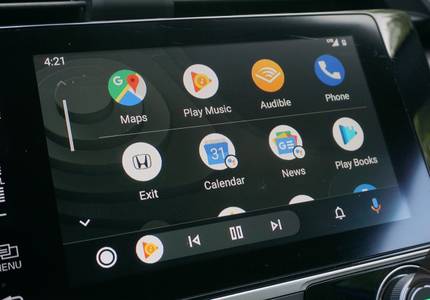
Android Auto adds custom shortcuts and re-enables Google Assistant routines
Routines return after the better part of forever

Wallpapers aren't the only new thing rolling out to Android Auto users this week, Google is also turning on some handy features to simplify activities while you're driving. Users can now add custom shortcuts to the launcher to quickly call pre-selected contacts or activate Google Assistant commands. Along with this, Google Assistant routines are available again after more than two years since they mysteriously stopped working through Auto.
Gmail's right sidebar makes it easy to access information at a glance. You can view your calendar, your tasks, or your notes right next to your emails, allowing you to cross-reference information and avoid appointment conflicts. And now Google has announced a new addition to the sidebar: Contacts. Once it rolls out to you over the next two weeks, you'll be able to view all of a contact's details neatly organized next to their messages.

Instagram is rolling out app shortcuts, only a full year after we first spotted them
There are also improvements to the archive

Android has supported app shortcuts since 2016, but some popular apps still haven't implemented the feature yet. We found evidence that Instagram was about to change that in October 2019, though it took the company until now to finally roll out shortcuts widely. Most people should now be able to tap and hold the Instagram icon on their home screen to quickly access the camera, create a new post, view their activity, and open direct messages. Additionally, Instagram has quietly reworked the Stories archive, which is now organized in three sections.

Google is improving the Alt-Tab switcher in Chrome OS, here's what you need to know
Adding interactivity is a good start, but it needs more to be a useful productivity tool
Alt-Tab is an often overlooked keyboard shortcut on Chrome OS that allows you to cycle recent applications without using a mouse. Despite the productivity potential, the Alt-Tab switcher is mediocre because it lacks interactivity. For example, you can't use the arrow keys or your cursor to select and launch recent applications, making them frustrating to access if they're placed towards the end. The developers at Google realize that the Alt-Tab experience can be better, so they tackled the interactivity issue head-on to help you quickly open your recent applications.

Google Assistant is rolling out a bare-bones clone of Siri Shortcuts
We're also getting more extensive food preferences
Haven't you always wished Google Assistant could do more with the apps on your phone? Not just launch them, but open specific sections or perform certain actions inside them? Even though Google has been talking about this kind of functionality for years, the reality is that these features have been limited and if they exist, they're nearly impossible to discover. We had to dig deep to find how the new Assistant on the Pixel 4 and 4a can do more in apps and in Chrome, but still, that's nowhere near what Apple and Samsung have been able to achieve with Siri Shortcuts or Bixby Routines — two features I've been eyeing with jealousy for a while. Now, Google is finally starting to roll out its own take on in-app shortcuts, though this is a very timid start. Additionally, Assistant is getting more extensive food preference selections.

Google Drive revises file shortcut behavior, pushes migration of existing multiple-location files to 2021
Making the transition to shortcuts a little less painful

Google introduced file shortcuts to Drive in March to the dismay of many, but some changes are now being made that will hopefully improve the overall user experience. There are several improvements being shared, most of which are being implemented now and another that will come into play next year.

Read update
Cloud storage services like Google Drive have made collaborative work massively more convenient, and soon(ish), it'll get even better: Google will begin testing file shortcuts in Drive over the next few weeks.

For some of us, task and calendar management is a chore on its own, and the faster we can do it the better. Assistant helps a bit, but now there's a quicker way to add an event from your browser, while sitting at your desk, thanks to Google's .new top level domain.


Shrinking a two-step process to a single step may not seem like much, but it sure feels a lot quicker. This could be why apps like Alfred, a macOS software to jump to navigate straight from the text box, are so popular. Google seems to have understood this last year when it started using the .new domain to allow creating new Google Docs in a single step. Now, you can also jump to a new Google Keep note by simply typing 'keep.new' into the address bar of your browser of choice.


If you haven't already used the ".new" domain shortcuts with Google's G Suite services like Docs, Sheets, or Slides, you're missing out. The feature allows you to quickly and easily create a new blank document (or spreadsheet, or presentation, etc.) without all the tedium of navigating Google Drive to open one. The only real disadvantage was they would previously only open a new document under your current primary Google account, but now you can append a number (i.e., docs.new/2) to open a new blank document under a different account listed in the switcher.

We've been using Android Q for a few months already, but we're still coming across some minor and unexpected changes in our favorite OS. Take for example the Quick Settings and notification area. It was redesigned from Oreo to Pie, then again from Pie to Q, and one of those changes involves a few invisible, but very confusing, shortcuts.