
latest
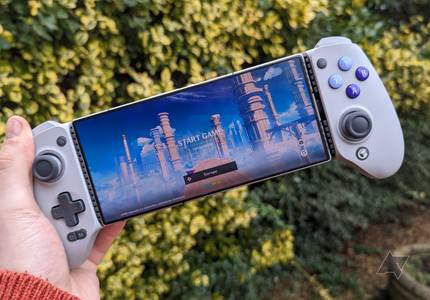
Gamesir G8 Galileo controller review: Function and form
The perfect controller that slips over your phone for easy marathon gaming sessions

Many of our favorite Android gaming controllers make ergonomic sacrifices to take up as little space as possible for on-the-go gaming. The Gamesir G8 Galileo is the biggest controller we've reviewed yet, but all this mass is put to good use. After testing the controller for a few months, I can also say it would be the best snap-on controller I've reviewed, if not for one major flaw.

Gamesir T4 Cyclone Pro controller review: Practically perfect
It's hard to complain about this excellent controller or its welcoming price
Gamesir’s recently released T4 Kaleid controller impressed us with its premium features in a budget package. Still, its lack of Bluetooth and phone clip support held it back from meaningful integration with the Android ecosystem. Gamesir’s newest controller, the Cyclone Pro, combines the budget powerhouse of the T4 Kaleid with Bluetooth and phone clip support to make it the perfect companion for Android gamers.
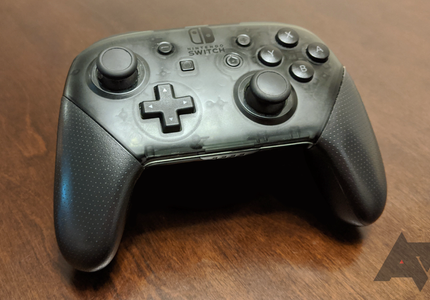
How to use a Nintendo Switch Pro Controller with an Android phone or tablet
Nintendo has ergonomics controller design down pat


When it comes to comfortable Bluetooth controllers, there's no better match than the Nintendo Switch Pro Controller. The sturdy and well-designed ergonomics make the Pro Controller one of the best for long gaming sessions. Its impressive design helps overcome the awkward B/A/Y/X button layout that perplexes many gamers accustomed to the Xbox controller layout.

Gamesir T4-Kaleid controller review: Affordable precision packed with style and substance
A few sacrifices keep the controller from greatness
The GameSir T4 Kaleid is a flashy controller packed with features to match any of our favorite Android controllers to date. While there are a couple of notable drawbacks when gaming on Android, GameSir’s new wired controller is perfect for any type of game, from FPS titles to fast-paced racing games. And at $41.99, you’ll be hard-pressed to find a better value controller anywhere.

Backbone is bringing its PlayStation-friendly controller to Android
Unfortunately, there isn't much more here beyond a snazzy makeover for the controller and app
Last year, the simple-yet-effective Backbone One mobile controller made its way to Android after a long stint as an iPhone exclusive. The PlayStation Edition version of this controller is following the same path, now available on Android devices with its slick white and black theme.

Moga XP-Ultra controller review: Jack of all trades, master of some
You won’t be disappointed with this premium controller outside of its price
The Moga XP-Ultra is a controller with plenty of tricks up its sleeve that doesn't compromise on quality. While the high price tag will put off those looking for a simple controller, it's clear that the Moga XP-Ultra is one of the most versatile and useful Android-compatible controllers around.

Cooler Master Storm Controller review: You get what you pay for
This gaming controller cuts numerous corners to hit its price point
Cooler Master’s Storm Controller is an Android and Windows gaming controller that aims to offer the essentials at a great value. I spent the last few weeks testing the Storm Controller to see how it stacks up against the best Android controllers on the market. While its massive battery sets it apart from many of its competitors, cheap construction and mushy buttons make it harder to recommend.

Turtle Beach Atom review: Comfortable Bluetooth gaming meets innovative design
You can't go wrong with this stellar Bluetooth controller
Snap-on controllers like those produced by Gamevice and Razer are some of the best mobile controllers around, but Turtle Beach’s Atom is an excellent device that can go toe to toe with any existing model. Thanks to its innovative design and massive battery, this is an excellent choice for anyone looking for a mobile controller, assuming they can stomach the price.

SteelSeries Stratus+ vs Duo: Which controller is best for you?
Which mobile controller has the edge you need?

If you need a quality controller for action-packed mobile gaming, you may have discovered the SteelSeries Stratus+ and SteelSeries Duo while shopping around. Since both controllers are virtually identical at first glance and are offered at the same price point of $60, you may wonder which model is the best option for your play style or if there are any fundamental differences between the two SteelSeries controllers.

Does the SteelSeries Stratus+ work with Android?
Can this affordable controller handle gaming on your favorite smartphone?
If you’re on the fence about streaming your favorite console games via your Android phone, the SteelSeries Stratus+ is an affordable way to test the boundaries of what your Android phone can really do. While some players are comfortable using native touch-based controls, others vastly prefer the enhanced precision and superior comfort of using a quality mobile gaming controller. Using a controller for reliably swift and pixel-perfect actions is an attractive concept for mobile gamers who value the lightning-fast inputs needed to win while playing fighters, shooters, and other action-packed experiences.

The popular Backbone One mobile controller finally works with Android phones
One of the best iPhone controllers finally makes its way to Android
Nowadays, mobile gamers are spoiled for choice when it comes to snap-on controllers, from the excellent Razer Kishi 2 to the adaptable Gamevice Flex. However, both of these controllers have drawn some inspiration from the Backbone One, a formerly iPhone-exclusive controller that's now available on Android.

The Gamevice Flex solves mobile's major controller problem, out now
You won't need to remove your phone's case to fit it into Gamevice's latest controller
There's a plethora of fantastic Android gaming controllers available, especially in recent years, but compatibility is often an issue for those looking for a Switch-style dual controller setup. This is where Gamevice's new controller, the Flex, comes into its own, boasting the ability to hold your phone with a case attached, even behemoth gaming phones. And as of today, the Gamevice Flex has been officially launched, now available to purchase for $100.
.jpg?q=50&fit=crop&w=430&h=300&dpr=1.5)
GameSir X2 Pro hands-on: The biggest problem with GameSir's controllers is finally fixed
Analog triggers are here, plus a free month of Game Pass with official branding included

GameSir has been on a tear coming up with some of the best mobile controllers on the market, where I last took the excellent GameSir X3 for a spin, but since the company has an all-new device launching today, I've spent three last couple of weeks running it through its paces to report my findings. The GameSir X2 Pro hits store shelves starting today for $80, offering a similar design to the original X2, but with the upgrades found in the X3 (sans its fan), and a few unique features all its own. So if your original X2 is starting to feel dated with its tiny face buttons and lack of analog triggers, GameSir is back with a refinement that damn-near perfects its best mobile controller design. Let's dig in.

GameSir X3 hands-on: Big on cooling and big on price
The GameSir X3 offers active cooling suitable for just about any phone, but it comes at the cost of portability
Side-by-side controllers that you can slap your phone into have been all the rage ever since Gamevice made waves with its iOS controllers for iPhones and iPads back in the 2010s. Soon after that, Gamevice partnered with Razer to create and launch the Razer Kishi, which now offers a successful follow-up that looks a heck of a lot like the Backbone, another iOS-specific side-by-side controller (coming to Android this winter).

Gamevice's next controller looks just like a Kishi with a few upgrades
Full-size thumbsticks are included, a worthy upgrade indeed
Gamevice isn't a name you often hear, but this is the company that partnered with Razer to create the Kishi controller, which has found tons of success as one of Android's best controllers. Well, now that Gamevice and Razer have amicably split, Razer has already released its Kishi follow-up by leaning heavily on Backbone's design (who has already announced their own controller for Android, slated for a winter release), and Gamevice, in turn, basically rebranded excess Kishi stock as the Gamevice for Android and Gamevice for iOS. Today Gamevice has announced a follow-up to its rebranded Kishi, known as the Gamevice Flex, and it's available for pre-order starting today, with the release window set for this fall.

8BitDo’s new Bluetooth controller aims to make gaming accessible for everyone
It lays flat, stays put, and has all the buttons on the face

Despite the rhetoric in some darker corners of the internet, video games are for everyone. Unfortunately, not all gamers have the manual dexterity or strength to hold a standard game controller. That's where 8BitDo’s new Lite SE comes in. It's been designed with accessibility in mind and costs just $35, much less than other limited mobility controllers.

SteelSeries Stratus+ hands-on: The best controller for Android just got better
An already great controller, now with USB-C and a phone clip
I've been using the SteelSeries Stratus Duo for many years as my go-to Android controller when testing games, but there's no doubt it was growing old with its micro USB port. Thankfully, SteelSeries has updated the iconic Stratus Duo, launching the Stratus+, complete with some handy upgrades, such as USB-C support and a new controller clip (now packed in the box). However, the 2.4GHz WiFi support found in the Stratus Duo is gone, along with the USB dongle. Still, the Stratus+ is the Duo perfected, and here's why.


Stadia has seen its fair share of controversy since it first launched, especially regarding its available features. In the last couple of years, abilities like voice chat and a search feature in the store have finally made appearances, helping to make the platform feel far more complete. Google has made an effort to add many of the promised features alongside some new and exciting ones to the service, but it's still a work in progress.

8BitDo's excellent Android-friendly Pro controllers are on sale for Black Friday
Plus support for Stadia, Steam, Switch, and more

With the holidays fast approaching, you might finally have time to dig into that backlog of games you've built up over years of sales and impulse purchases. Whether you're streaming Stadia to your Chromecast, playing through another run of Dead Cells on Android, or trying to buy any of those fancy new consoles, a good controller is a must. 8Bitdo makes some of our favorite third-party controllers around these days, and two of its best are on sale for Black Friday.


When it began shipping last year, the Stadia Controller worked wirelessly on TVs hooked up to a Chromecast Ultra, but using it with any phone or laptop required it to be connected via USB-C cable, which doesn't make for the most comfortable gaming experience. Earlier this year, Google rolled out the ability to connect wirelessly via the Chrome browser, and starting today, users can now do it with any supported Android device as well.