
latest
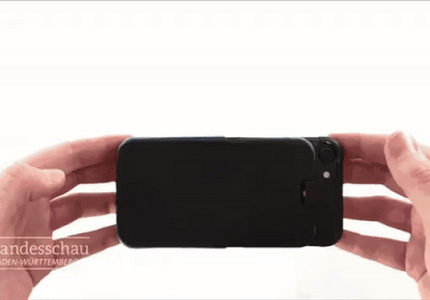

Smartphone cases, in all their various forms, are meant to do one thing: guard our increasingly expensive pocket-sized supercomputers in case we lose our grip as we absentmindedly jab at them with one finger while also walking and drinking coffee. There are many that do a pretty good job of this, but a German engineering student was evidently dissatisfied with the level of protection afforded by what's currently on the market. So, naturally, he created ADcase, a silly and wonderful contraption that detects when your phone is falling and ejects springy spider legs to dampen its impact.


When your smartphone gets old, you may pass it along to a relative, sell it to someone else, or chuck it in a drawer and forget about it. Not this guy though. He goes all iFixit on them, grabs his Philips screwdrivers and priers, and dismantles them down to their smallest components, then he hangs them on a wall like the nerdiest of all art collections.

We can all yell at our Google Home to start playing something, but what if it was possible to choose our songs in some other super cool, super throwback way? hoveeman thought this through and built an awesome jukebox-style system for his Google Home and Chromecast speakers. Before I bore you with the technical stuff, check out the video below to see how things work.


Google is working on its own in-car Android experience that's only just now starting to trickle into vehicles. The downside is that it's going to cost you either the price of a new car or something in the vicinity of $1,000. Some folks would prefer something cheaper, more hands-on, if you will. This one guy has taken to Reddit to show off the experience he's managed to throw together in his Toyota Prius using a 2013 Nexus 7.


Update: The developer contacted us to let us know that the update he showed off hasn't been applied yet, but will be released very soon.

Artist Janet Echelman builds giant, living sculptures that respond to the elements around them. These massive works of art typically sway in the wind, flow with the water, or respond to light. This time, Echelman's work is interacting with Chrome. Her piece, built in collaboration with Google Creative Director Aaron Koblin, now descends over water and walkways from a Vancouver skyscraper, changing color in response to the input it receives from visitors on the ground.

Droiders is an app-developing startup, and today it's launching MedicAR, a piece of Glassware that uses augmented reality to assist students studying to become surgeons. It guides them through certain procedures, showing them where to cut, what tools to use, what to do next, and how to close things back up afterwards. The video below shows it in action, and don't worry, it's not graphic.


The Photospheres feature has been a photographic novelty thus far, but today Google Maps has added some notable functionality. The Views section of Google Maps already lets you place your own 360-degree panorama on specific points in the world, but now you can connect them via virtual paths, creating an instant, locale-specific Street View. Other users can then view it and move between multiple Photospheres for a more complete experience.

The Nexus 4 below was created without using any external images. Okay, the one below is actually just a screenshot of a Nexus 4 designed entirely using CSS and JavaScript, but the real deal is hosted over at CodePen. The smartphone is somewhat interactive - you don't have access to the home screen or the Play Store, but you can play around with the dialer. The tabs can be switched, even though they don't lead to anything for the time being. All of the code is visible for anyone who wants to see how the sauce is made.


I know what you're thinking: "Oh, no... not another social image sharing app!" And if this were anything like that, I'd share you sentiments. But it's not – it's actually quite refreshing, because this app focuses solely on sharing and not at all on social.


Today, BlueStacks - a company specializing in Android app integration in Windows - will be making two large, and (hopefully) impressive announcements.

I really, really love apps that let me remote access my phone. In the past, I've used apps that let me take screenshots remotely, access my SMS remotely, and do a few other simple tasks without ever having to touch my phone.

Let's face it: It sucks waiting for your phone to turn on. It takes too long, and you're forced to watch what is essentially a commercial for your carrier and hardware manufacturer. Well, no more! Here are five bootscreen animations that will make rebooting your phone a much celebrate event! Have your friends gather round and watch at the spectacle that is your phone powering on! Gasp at the twists and turns of pretty images on your screen before your device has even turned on!

If there's one thing an Android power user really appreciates, it's options. I personally enjoy having a myriad of different apps to choose from for a single task so that I can find the one that best suits my needs, one of which is typing.

Squishable.com was cool enough to send me one of their Squishable Androids, and I must say: this thing is pretty awesome. It's a big old pillow/friend that the whole family can enjoy. At first, I wasn't sure if my Squishable Android and I had much in common, but after spending the day with him, we are now best friends. Here are some of the things we did together: