
latest
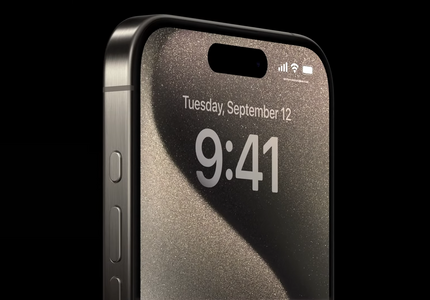
I want every Android phone to steal the iPhone 15 Pro's Action button
Gimme those physical shortcuts, please

It's iPhone week, and even for those of us deeply entrenched in the world of Android, it's difficult not to pay the company a little attention to what's happening on the other side of the fence. And while the regular iPhone 15 (and its supersized counterpart) have done little to impress me, I'm admittedly a bit more swayed by the Pro series this year. The titanium chassis, superb (on paper) camera lineup, and the long-awaited switch to USB-C are all positive directions for the company, but as an Android fan, what really has me green with envy is the new Action button.
What's new in Chrome 92 (APK Download)
Better performance meets more security and tons of new features

Read update
Google releases new Chrome builds every six weeks, and the latest version to launch is Chrome 92. The new browser is available for download since yesterday, and it comes filled to the brim with interface experiments, security improvements, web app enhancements, and performance upgrades. Here's what you need to know.
Google Photos now telling users what those buttons in the media viewer mean
So those slider things... that's an editor?

Ever press a button without knowing what it exactly does? Maybe some of the icons aren't exactly self-explanatory. Google Photos has had a few of those for a while. Well, the cavalry's just come in and they're bringing in labels.

Google Assistant is everywhere from phones to laptops, headphones to TVs, and even future gaming controllers. Chrome OS brought the assistant right to the operating system, though the feature is still considered "experimental." It could soon be easier to use, though, as the company's working to enable push-button access from keyboards and other accessories.

Samsung has stood firm against the trend of removing headphone jacks from smartphones, but it might be on the verge of ditching some other important pieces of its next flagship device. Rumors point to the Galaxy Note 10 as one of Samsung's first buttonless phones with no physical volume or power buttons. One potential upside: no Bixby button, either.


Google is the king of server-side tests, but it's by no means the only company that does them. Instagram also uses them fairly often, and this time around, it's trying something that may make some people a bit annoyed. It's experimenting with swapping the profile and DM icons, as well as putting a row of emoji in the comments section for quick access.


We're back again with some more changes/tests in the Facebook app spotted by you sharp-eyed readers. The more obvious of the two is a redesign of the Like, Comment, and Share buttons, but we also have some users who are seeing an option in the App Settings to cache some videos for offline viewing. Good stuff.


Honeycomb, the first Android version designed specifically with tablets in mind, was released way back in February 2011. It was built exclusively for large screens and was never meant to reach phones, but it paved the way for Ice Cream Sandwich, arguably one of the most significant updates to ever hit Android. Taking several cues from Honeycomb, Android 4.0 brought about some of the biggest changes to the OS, not the least of which was the advent of virtual or on-screen navigation buttons.


Something interesting is happening on the Play Store this evening. Users are reporting mysterious "Play Daily" and "Dogfood Apps" buttons appearing on the store's home and apps pages, respectively.


Is Google+ 4.8 a big deal? Not unless you're really into seeing a few buttons get moved around. But since these changes do impact how people use the app, we're going to detail them nonetheless. Here goes.
The Optimus G2, which we've been waiting for, has been subject to rumor after rumor. A few days ago, we finally heard something official that probably tells us the G2 will have a Snapdragon 800 processor (LG and Qualcomm stopped just short of explicitly naming the device), but tonight we've got something a little more fun.
Top Android Apps Every Rooted User Should Know About, Part 8: Apps 58-65
There are plenty of apps in Google Play these days, but a relatively small proportion are designed to unlock the power of a rooted device. Since it can

There are plenty of apps in Google Play these days, but a relatively small proportion are designed to unlock the power of a rooted device. Since it can be easy for these powerful apps to get obscured by the crush of retro, free-to-play, side-scrolling platformer games, we like to aggregate the best root-only apps on occasion. Whether you want to free up some screen real estate, change icons around, or manage your backups, the apps you need are right here.

One of these days, we're finally going to figure this whole buttons problem for Android devices. While touchscreens are great, the tactile feeling of physical controls will always have its appeal. Some solutions are better than others, but maybe the Wikipad can find the sweet spot. The tablet comes with an attached set of game controls that can be removed, leaving the player with a regular 7" Tegra 3 tablet. The entire unit costs $250.

Innovation is great. You know what it does? It solves problems. Not problems like 'What is beauty?' because that would fall within the purview of your conundrums of philosophy. Innovation solves practical problems. For instance, "How am I going to stop this big mean 5" 1080p display from tearing my battery and hand a structurally superfluous new behind?" The answer, according to HTC? Use a mini phone.

[CES 2013] PowerA Announces A New, Bigger MOGA Pro Controller, For The Large-Handed Among You
PowerA Announces A New, Bigger MOGA Pro Controller, For The Large-Handed Among You

Back when I reviewed the original MOGA controller, I had two problems with the controller. First off, the software was cumbersome (though I didn't cover using third-party drivers to use it with emulators or anything like that), and secondly, while it was a good size, it still felt just a little too small. Well, the MOGA Pro solves at least one of these problems by being bigger, better, and more button-y.

Sony And Google Show Off New GoogleTV Box With A Remote That Resembles A Space Shuttle Control Panel
You guys remember Google TV, right? It's the project that every CEO and their mothers stood on a stage with to declare war on Apple's AppleTV hobby? Yeah, those guys have been pretty quiet since about that platform for a while now. Sony, however, got up the nerve to announce a new Google TV box at a special event in Palo Alto. Where "announce" means "say some words near, without actually talking about."


One of the most prominent new features on the Galaxy Nexus, and Ice Cream Sandwich, is that the soft-keys are displayed right on the screen. While the notion is a sound one, there will always be those who miss some of the legacy features left behind. In this case, those would be the Menu and Search keys, stalwarts of Android's interface paradigm since its release with the G1. What was once four buttons - Home, Menu, Back, Search* - has been whittled down to just Home and Back, along with the introduction of the new multitasking-purposed App Switcher button. This combination was seen previously in Android 3.0 Honeycomb, but is about to encounter widespread use on upcoming phones**.

Adding to the heap of shiny new features brought to us in Ice Cream Sandwich, we've got a new lock screen, and of course the fabled virtual button bar.